Shopify vs. Wix vs. WooCommerce: Which Platform is Right for Your Book?
Selling your books directly is a pretty good idea. I’m not just saying this because I work for a publishing technology platform, and it’s literally my job to say. It’s also very true.
Retailers like Amazon introduce red tape and restrictions, take a cut of your profits, and keep all of your customer data. You don’t own the process or the pages, meaning your content is held hostage on the retailer’s site.
If you have an audience and you’re actively working to sell your books, you are in the perfect place to take advantage of direct-to-consumer sales by using an ecommerce platform and print-on-demand. You’ll earn more, have more control, and you won’t be at the mercy of a retailer’s site or policy changes.
The only question left is: which ecommerce platform?
Finding the Right Ecommerce Platform
Lulu’s print-on-demand technology is built on APIs. Which means if you’re savvy with programming languages, you can connect our print network to ANY ecommerce option. If the idea of trying to figure out APIs, VS Code, and sandboxes is daunting, we offer direct connections to three of the most popular options:
- Shopify
- Wix
- WooCommerce
Each one has strengths and weaknesses. To help you understand which one is the right platform for your brand and your books, I’m going to break each one down.
What is Lulu Direct?
First, let’s quickly go over what Lulu Direct is and how it connects to your preferred ecommerce platform.
Basically, Lulu Direct is part of your free Lulu account, accessed by clicking My Stores while logged in.
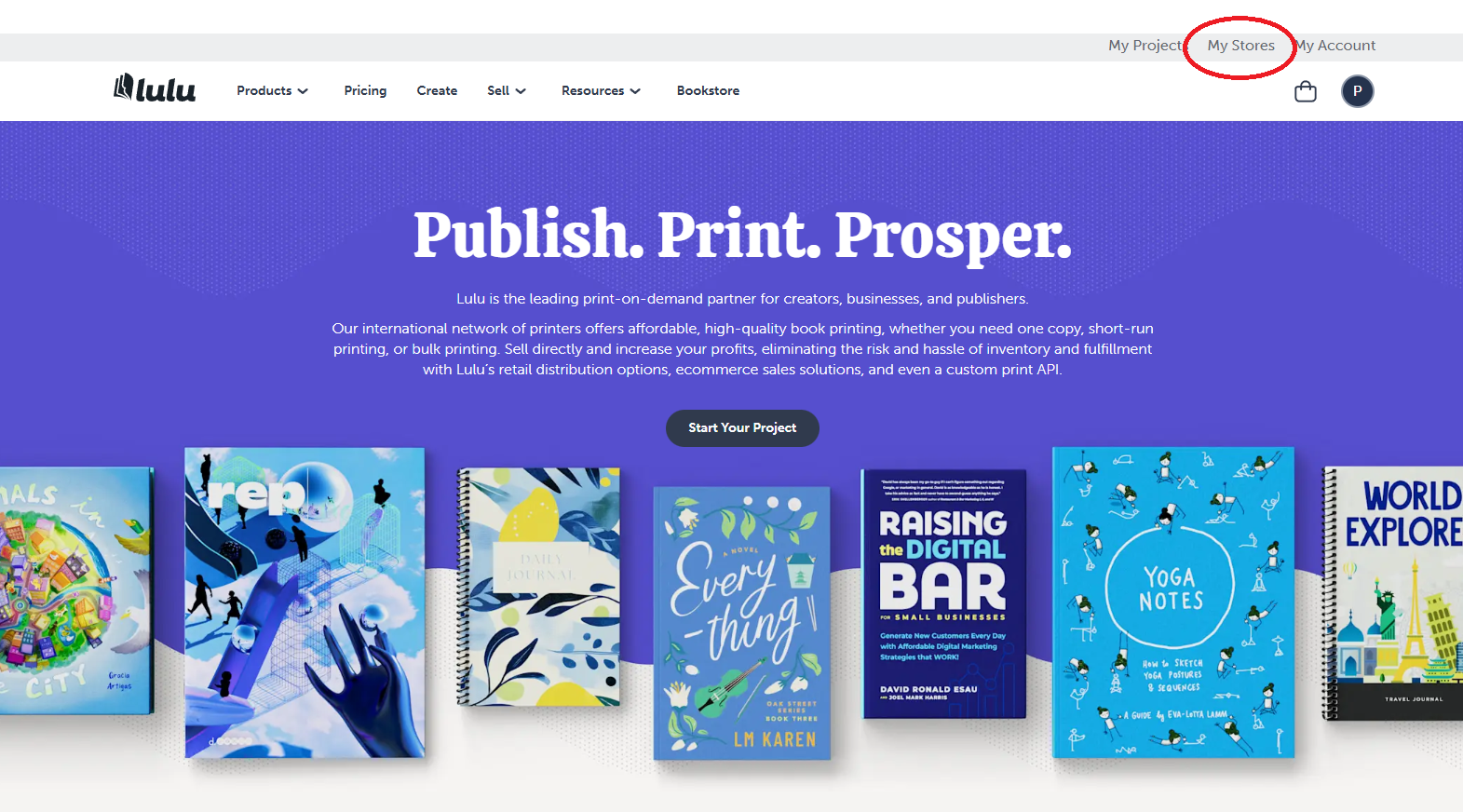
This will bring you to your Lulu Direct dashboard, a hub for accessing all three of our direct connections (Shopify, Wix, and WooCommerce), as well as using our Order Import tool. From this dashboard, you’ll connect your preferred ecommerce platform, view your sales, manage your orders, and apply store settings for your books.
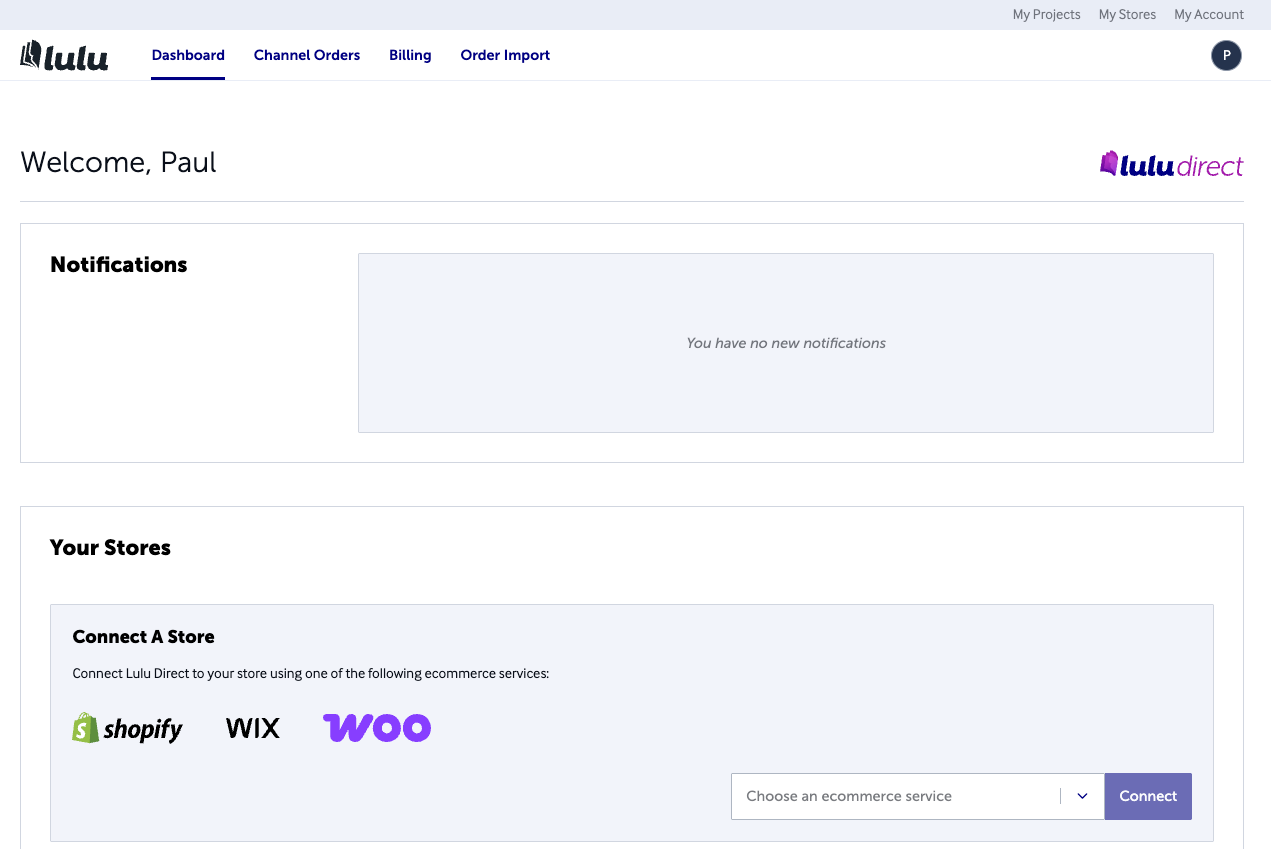
To connect your ecommerce platform, select it from the list and follow the steps. We make it easy—but you will need to have your store set up on the ecommerce platform first. You’ll need to refer to each platform’s documentation for that setup process.
 Kristen
How to Choose: Shopify or Wix or WooCommerce?
While you can connect any ecommerce platform using our APIs, we’ve built direct connections (Lulu Direct, get it?) to the three most popular: Shopify, Wix, and WooCommerce.
Each has its strengths and weaknesses. If you’re not a developer, don’t know one, don’t have one on staff, and you’re unsure about vibe coding your way through API connections, using one of these ecommerce platforms is the fastest and easiest way to connect your website to Lulu’s print network.
What does that mean? You’ll create a project on Lulu, connect your ecommerce platform, and then sell books directly from there. We’ll print and ship, charging you just for those services, while ensuring your orders are white-labeled and free of Lulu branding. Your store, your book, and your customers. Lulu is just your print and fulfillment service.
Okay, let’s dig into each platform to find the right one for your books and business.
Platform Comparison: Shopify vs WooCommerce vs Wix
Shopify: The Gold Standard for Ecommerce
Shopify isn’t the first ecommerce platform, but it is the most successful of the early forays into this model. And they’re still the most popular option, owning upwards of 30% of all ecommerce transactions.
They became this big because they offer everything you might need alongside a cart—you can build a website, host a blog, and use plugins to modify without coding.
Shopify Pros
The biggest benefit to creators and authors for Shopify is the simplicity. They make it very easy to build a storefront and product pages, complemented by a vast array of apps to build your functionality.
Shopify is also the only one of the three options that uses Lulu’s live shipping rates. This means you can show the exact shipping rates we charge in your cart, ensuring you charge the right amount to cover shipping every time. Along with that, Shopify has an automated system in place to ensure your customers receive shipping and tracking notifications.
Finally, you can use Shopify to add ‘buy buttons’ to almost any site. This means you could use another service to host your site, Shopify to add a cart experience, and Lulu Direct for the printing and shipping. This feature makes Shopify the most versatile option for creators.
Shopify Cons
The biggest problem with Shopify is often the pricing. Their service isn’t cheap (see the next section for pricing details), and you’ll need to factor that into your business plan. Shopify also (recently) shifted to live chat as its only support option. This isn’t the biggest problem, but it does mean you have to plan to be available to go back and forth with a support agent in real time to solve problems, rather than getting fast answers by phone or responding in your own time via email.
The other problem you might run into with Shopify is the need to use apps. For example, you won’t be able to sell digital products (like ebooks) without using another app. While this isn’t a huge issue, using multiple apps can sometimes lead to conflicts or issues with your store. It’s something you’ll need to be aware of when setting up and testing your Shopify site.
Shopify Pricing
Shopify offers a total of six plans, each with unique features and price points. Here’s the quick breakdown based on their current pricing:
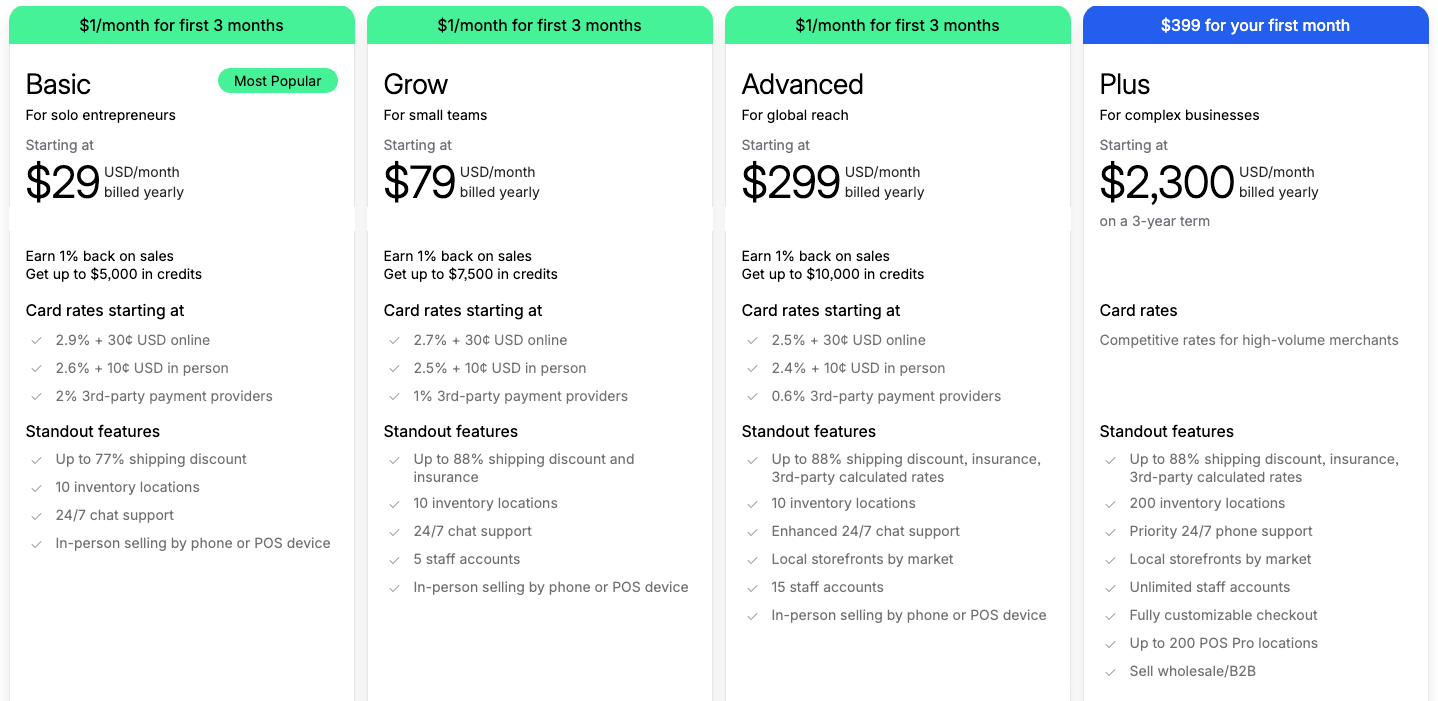
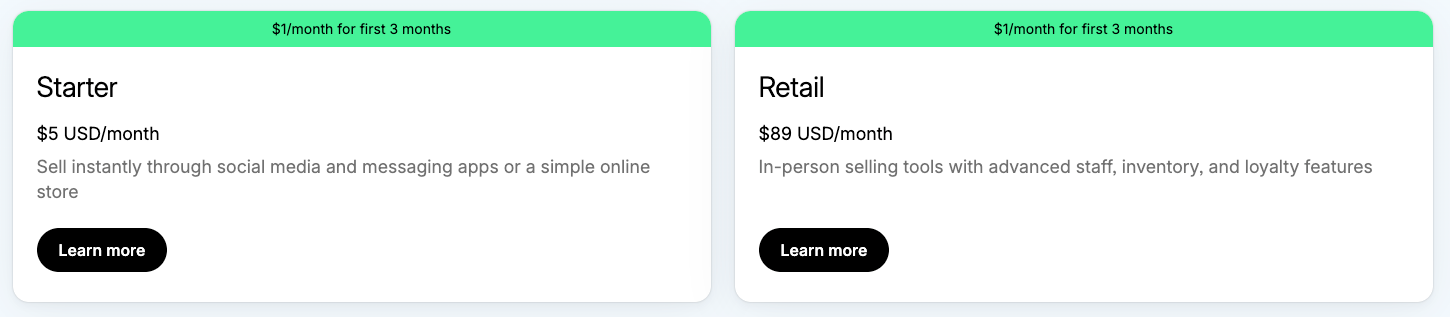
For most creators, the Basic and Grow plans will have the options and features you need without being overly expensive. And if you’re just getting started, the Shopify starter plan is basically just an embedded cart that lets you sell with none of the bells and whistles.
Having a range of pricing options makes Shopify very accessible, but note that the price does creep up as your business scales.

Sell Your Book, Your Way
Sell books on your Wix, Shopify, or WooCommerce website with Lulu Direct.
Or use our Order Import tool for your next book launch.
Wix: The Simple Option for Creators
While Shopify focuses on ecommerce, offering website and blogging tools, Wix flips that model. They emphasize building your site and setting up a blog, then following that up with the ecommerce side. With Wix, you focus on building simple, elegant sites to host your content and storefront.
In recent years, Wix has leaned into AI-first design, letting users essentially tell the AI what they need from their site, then watch it come together. For more hands-on creators, you can use themes and apps from third-party developers to build a website without any coding knowledge or skills.
Wix Pros
The value of Wix lies in its simplicity, just like Shopify. The key difference is that Shopify is ecommerce first, and Wix is site first. Wix’s ecommerce tools aren’t as robust as Shopify’s, but you can build product pages and sell directly easily.
There are a number of useful tools built into Wix as well. They’ll handle emailing your customers automatically for you when they purchase. And you’ll have access to their marketing suite, including email, data analytics, a built-in CRM for supporting your customers, and more.
The biggest benefit of Wix remains the simplicity and speed with which you can put together a new site and storefront. Particularly if you’re new to selling direct and want to keep the process low-lift for yourself, Wix is the best option.
Wix Cons
Using Lulu Direct with Wix doesn’t allow for accessing our Live Shipping rates. That means you’ll need to set up your own shipping rates in Wix and monitor Lulu’s shipping costs to ensure you’re charging enough. It’s not a huge challenge, but a layer of work you’ll need to manually set up.
Another limitation of Wix is that you’ll have to use their cart and checkout experience only on your Wix site. Other ecommerce services (like Shopify) have options to drop an embedded cart into other sites or social media pages. With Wix, you’ll need to drive those customers to your Wix product page to complete the sale.
Wix Pricing
You’ll have four tiers to choose from, each with a different monthly cost. It’s important to note that their Light plan does NOT include ecommerce. You’ll need to go with Core or better to get access to online selling. Otherwise, their pricing is pretty comparable to Shopify.
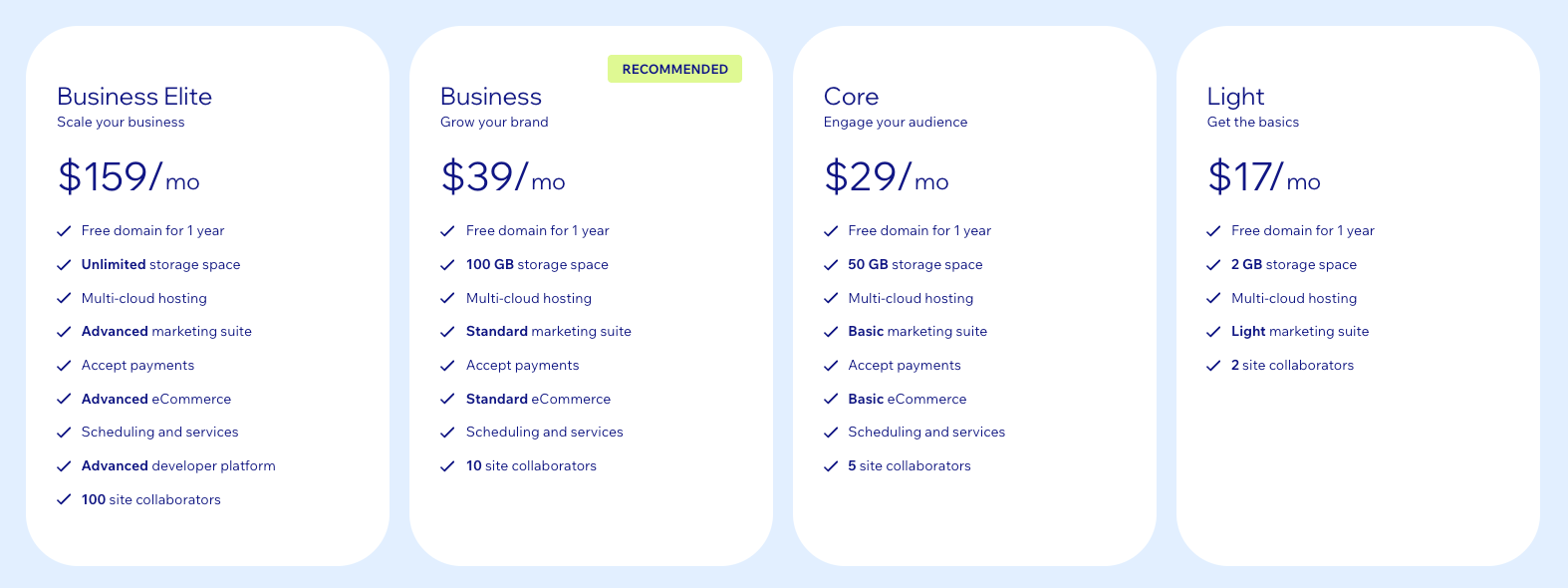
You’ll want to really carefully review each tier before starting with Wix. The tools you get—marketing and ecommerce in particular—also change with each increase in the monthly price.
These prices are all based on monthly rates. Wix doesn’t do annual discounting, so what you see is what you pay.

Your Free Lulu Account
Create a Lulu Account today to print and publish your book for readers all around the world
WooCommerce: Built for WordPress Users
Finally, we have WooCommerce. Originally built as an open-source plugin for WordPress, Woo was purchased by Automattic (WordPress’s parent company) in 2015. Since then, they’ve built WooCommerce into THE ecommerce platform for WordPress sites.
You can use WooCommerce on its own to create a storefront with a ton of features and extensions. You’ll also see the option to directly use Woo inside your WordPress dashboard, making it the easiest way to set up your store if your website already uses WordPress.
WooCommerce Pros
First, the obvious—if your site is built on WordPress, WooCommerce is the obvious choice for your ecommerce. You could use Shopify if you really wanted to, but Woo is built for and built into WordPress. And if you’re already on WordPress, WooCommerce is free to install.
That alone is a huge advantage, though it does come with an important caveat I’ll cover next.
Because WooCommerce works with WordPress, it means you can use almost any hosting service and build your own WordPress site to suit your needs. This gives you far more control over your pages than either Shopify or Wix offers. With a little bit of learning (or vibe coding), you can edit any aspect of your WordPress site.
That means you can build and sell without any fees, though you will have to pay to host your site.
WooCommerce Cons
Being a WordPress ecommerce platform comes with the obvious disadvantage of being beholden to WordPress. While it can be great if you know how to build on it, WordPress relies on third-party plugins and antiquated code.
While the platform is free, you’ll pay for hosting. You’ll likely need to pay for some functionality as well. WooCommerce doesn’t include shipping information, so you’ll need their paid plugin to handle thatthird-party plugins.
You’ll also need to build your own shipping rates, just like with Wix. WooCommerce can’t use Lulu’s Live Shipping. That means you’ll need to set your own rates and ensure they match or exceed Lulu’s rate to avoid having to pay for shipping costs.
WooCommerce Pricing
Technically free. Hosting is a necessity, so you’ll need to pay for that at least. But WordPress and WooCommerce can be used for free to build your site, product pages, and cart.
Deciding on the Right Ecommerce Platform
It’s really all about what you need and value the most.
- Store features? Pick Shopify.
- Simple design? That’s Wix.
- WordPress user? You’re going to want WooCommerce.
Think carefully about which platform includes the most important options and features for you. Then spend some time on their websites, going over the options and features you’ll get for each plan. It’s vital to do your background research here. Once you’ve committed, it’s a lot of work to switch, so try to be sure you’re getting what you need.
No matter which option you go with, Lulu Direct connects easily, giving you access to our print-on-demand network, Order Import tool, and various direct-to-consumer options like white-label printing and automated fulfilment.